 SimPostureEngineering your perfect driving position
SimPostureEngineering your perfect driving position
SimPostureEngineering your perfect driving position
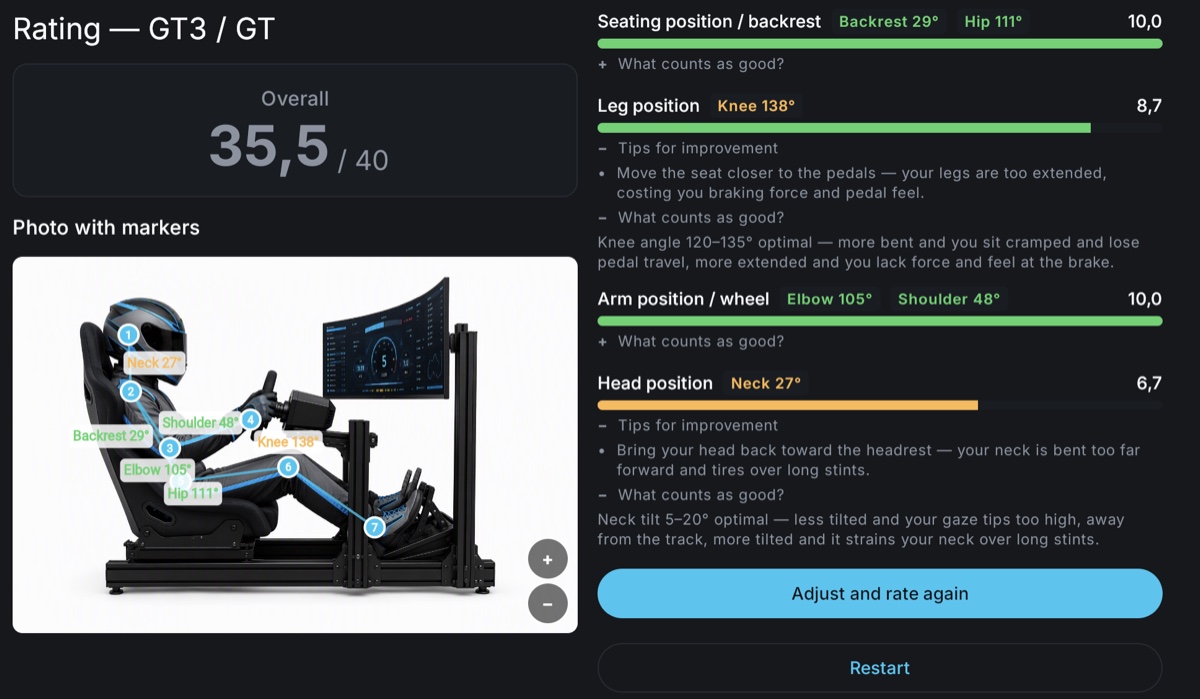
SimPosture photographs you from the side in your seating position, analyses your posture and rates it for your vehicle class. You get a score per category and concrete tips — and get closer to the optimal position photo by photo.
An ergonomics tool for sim racers. The app detects your body posture in the image, measures the angles that matter — backrest, knees, arms, distance to the wheel — and compares them against what's ideal for your vehicle class. A GT3 seating position is a different thing from a formula car; SimPosture knows the difference.
For sim racers with their own rig and racing seat — from an entry-level build to a dedicated rig with a formula seating position. No ergonomics background needed; the app guides you.
Which angles you can even adjust depends on your seat and how it is mounted — recliner or bucket, angle-adjustable or fixed. Start here: Sim rig setup: seat type and mounting.
Road, GT3, Prototype/LMP, Formula and Rally each have their own target values for the seating position — from upright and close to the wheel to strongly reclined with raised legs. SimPosture rates against the class you actually drive. The target angles per class are explained in our guides:
Photo and analysis run entirely on your device. No upload, no servers, no sign-up, no tracking services — the app only needs the camera, plus your photo library when you pick an image there or save a rating, and everything works offline after loading.
Now a native app for iOS and Android — or right now directly in your browser at the rig PC, no install needed.